How to Sign Up on Socinet and Apply for a KIIP Course
A screen-by-screen guide to Socinet, the Korean-only KIIP site: sign-up, placement, course applications, the waitlist, fees and booking tests on kiiptest.org.
On this page10
Everything in the Korea Immigration and Integration Program goes through one website: Socinet (사회통합정보망, socinet.go.kr), run by the Ministry of Justice. You sign up there, get placed at a level, apply for a class, pay the course fee and see your results. The tests themselves are booked on a second site, kiiptest.org, which needs its own account. Socinet isn't built for phones, neither site is built for English speakers, and those two facts cause most of the problems people run into.
We went through Socinet's public pages in October 2026, up to the point where the sign-up form asks for personal details, and checked each later step against the Ministry's August 2026 participant FAQ and the evaluation site's notices. We did not create an account, so the screens after the terms page are described from those official instructions. If anything here doesn't match what you see, the Immigration Contact Center (1345) handles Socinet account problems.
Before you start: checklist
- A PC, or your phone browser switched to desktop view. The Ministry's FAQ says Socinet doesn't support mobile layouts, and fee payments in particular fail on the mobile view.
- Your alien registration card or residence report card. If you don't have one yet, your passport, which lets you join as a short-term member.
- A mobile number you will keep. Password resets are checked against the number on your account.
- An email address and your current registered address, exactly as immigration has it.
- A password of 9–20 characters mixing letters, numbers and symbols. The test site needs a different one: 8–16 characters, same mix.
Step 1: find the sign-up link
On the home page, the links you need are in the top right: 회원로그인(Log in) and 회원가입(join membership). Apart from a "siteMap" link, those are the only English labels on the page. The main menu is all Korean. Under 사회통합프로그램 (KIIP) you'll find information pages (purpose, courses and hours, procedure, evaluations), and three items you'll use later: 단계배정 (placement), 과정신청 (course application) and 평가신청 (evaluation application). Clicked without logging in, each of those three only shows an alert saying you aren't logged in, so don't read that as a fault. They work once you have an account.
Step 2: the terms page
"join membership" opens 이용약관 (terms of use). Two small flag icons above the text switch between Korean and English, and the English version is a full translation. At the bottom is the personal data notice, which tells you what you'll be asked for:
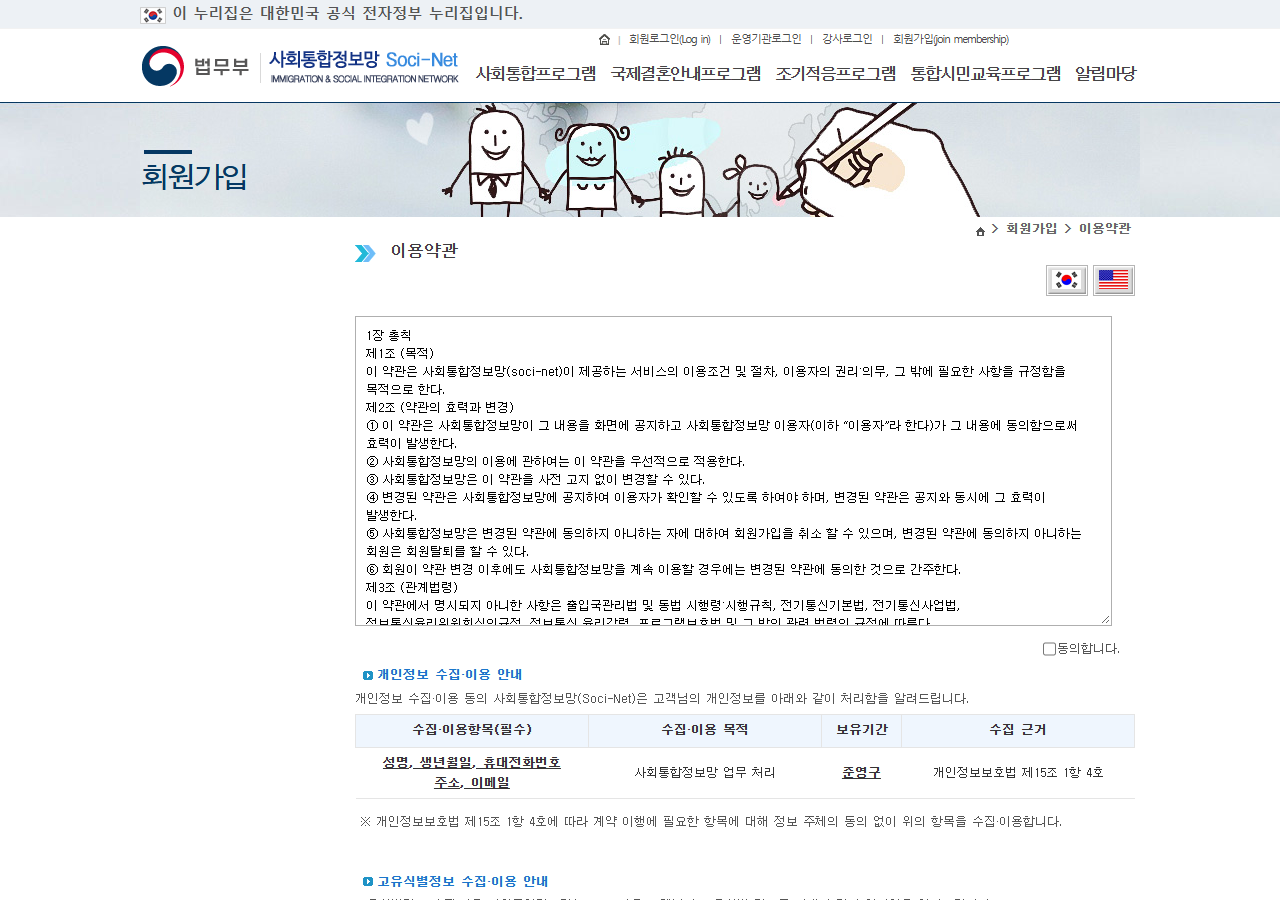 Socinet's sign-up terms page, October 2026. The flag buttons at the top right switch the terms between Korean and English; the table below lists the personal data collected (name, date of birth, mobile number, address, email).
- Required: name, date of birth, mobile number, address, email. Kept semi-permanently.
- Unique identifiers: resident registration number, alien registration number or passport number, processed under Article 101 of the Enforcement Decree of the Immigration Control Act and kept for three years after you leave.
To continue you tick 동의합니다 (or I agree on the English version) and press the button. If you land on the next page without having ticked the box, from a saved link for example, Socinet shows a general "the service is busy, please try again later" message (현재 서비스 이용량 증가로…) instead of the form. If you see that message mid-sign-up, start again from the join link rather than refreshing.
Step 3: choose your member type and fill in the form
According to the Ministry's FAQ, you choose one of three member types:
| Option | Who it's for |
|---|---|
| 국민 (Korean national) | Korean citizens, including naturalized Koreans |
| 단기체류외국인 (short-term foreigner) | Passport holders who haven't registered yet, e.g. C-3-8 |
| 등록외국인·거소외국인 (registered foreigner / residence card holder) | Anyone with an alien registration card or residence report card |
If you are joining because you have applied for naturalization, Socinet's own guide says to choose "귀화 신청자 대상" (for naturalization applicants) under 구분 (category), then enter your ID, password, name and date of birth. If you already had an account before applying for citizenship, you instead confirm your status later under My Page → 학사이력조회 (study history) → 귀화신청자 인증 (naturalization applicant check).
Two problems the FAQ addresses:
- Passport check fails (short-term members): visit the integration support centre at your immigration office, or phone them and fax a copy of your passport.
- You joined as short-term and now have an ARC: log in after registering and the account switches to a registered-foreigner account automatically. Don't make a second account; your history stays with the first.
Step 4: placement (단계배정)
Before you can apply for a class you need a level. In 단계배정 you either choose start from level 0 or go through one of the other routes:
- book the pre-assessment on kiiptest.org;
- for TOPIK, marriage visa or intermediate-course linkage, download the form from 알림마당 → 민원서식 (forms) and submit it with your certificate to your immigration office's integration support centre or a KIIP school, in person or by email.
Step 5: apply for a course (과정신청)
Each immigration office posts its term dates and application window before every term. In 2026 the standard terms are 2 January–10 May, 11 May–16 August and 17 August–13 December. Then:
- Open 과정신청 during the window. Only classes open for applications right now are listed, so an empty list usually just means the window isn't open.
- Each class shows its dates, times, location and capacity. Places are first come, first served.
- A full class can take up to three people on a waitlist. While you are waitlisted you can't apply for any other class, so cancel the waitlist first if you want a different one.
- You must choose a school in the area of the office that covers your registered address. If you work in another city, you need prior approval from that city's immigration office, with proof such as an employment certificate.
To find schools near you, Socinet's public 전국운영기관현황 page lists all 484 operating institutions with addresses and phone numbers, searchable by immigration office. Classes run on weekday days, weekday evenings and weekends. Online video classes run by the central institution are available for people who live far from a school, are pregnant, have mobility problems or work.
To cancel: My Page → the grey 상세 (details) button next to your level → 신청 취소 (cancel application). Once the school has assigned you to a class, only the school can cancel it.
Step 6: pay the course fee
Fees started on 1 January 2025: ₩100,000 per level for levels 1–4, ₩70,000 for level 5 basic and ₩30,000 for level 5 advanced. Payment opens before the course ends and you get a text when it does. Go to My Page → the status menu → 결제 (pay) and choose credit card or bank transfer. If the payment window won't load, switch to a PC. Unpaid fees block you from booking the evaluation.
Step 7: book tests on kiiptest.org
The 평가신청 menu on Socinet sends you to kiiptest.org, where you sign up again. The booking steps are log in → choose the test → choose the region and site → pay ₩38,000 → check the booking. The Foundation's October 2026 notices add:
- you can book from a computer or a phone, but you are logged out automatically 10 minutes after logging in;
- for the busy paper tests, go in through the site's queue page, then log in, then register;
- paper-test regions disappear from the list once their seats are gone;
- for a paper test, your admission ticket and exact venue arrive by text three days before the test, after 3 p.m.
Korean menu labels you'll need
| Korean | Meaning | What it's for |
|---|---|---|
| 마이페이지 | My Page | Status, fees, results, certificates |
| 회원상세정보 | Member details | Update address (체류지변경) and visa status (체류자격변경) |
| 단계배정 | Placement | Choose level 0 or start a placement route |
| 과정신청 | Course application | Apply for a class |
| 평가신청 | Evaluation application | Link to kiiptest.org |
| 학사이력조회 | Study history | Records; naturalization applicant check |
| 이수정지 | Suspension | Pause your studies (apply within 15 days) |
| 민원서식 | Forms | Linkage and level-change forms |
Troubleshooting
| Problem | Fix |
|---|---|
| "Next step" won't work on kiiptest.org | Update your address or visa on Socinet (My Page → member details), then try again |
| Payment window fails | Switch browser (Chrome, Edge) or clear cookies and cache; use a PC |
| Forgot your Socinet password | Reset it via "find ID/password" (아이디/비밀번호 찾기) under the Log in link, using the mobile number on your account |
| Locked out of kiiptest.org after 5 failed logins | Contact the Korea Immigration Service Foundation (02-2643-2583 or 2584) or post on the site's Q&A board. Reset the password before the fifth try to avoid this |
| Mobile number changed, so the reset fails | Call 1345, or visit the integration support centre with your ARC or passport |
| Pop-up says you are not a naturalization applicant | Run the naturalization applicant check under study history first |
Once you are placed and enrolled, the KIIP levels guide explains what each level leads to.
Frequently asked questions
04Is Socinet available in English?
Only partly. The sign-up terms can be switched to English and the Log in and join membership links have English labels, but the menus and My Page are in Korean. The Ministry says the sign-up menu supports eight languages.
Why can't I see any KIIP classes in the course application menu?
The menu only shows classes that are open for applications right now. Outside the application period it is empty. Each immigration office announces its term schedule and application dates, so check those and apply on the opening day, because places are first come, first served.
Can I sign up on Socinet before I get my alien registration card?
Yes, as a short-term member with your passport. After you register as a foreign resident, your account switches to a registered-foreigner account automatically the next time you log in. You can't attend classes until then.
Do I need a separate account to book KIIP tests?
Yes. Since 1 January 2019 the tests are booked on kiiptest.org, which you reach from Socinet's evaluation menu. The Ministry says the two sites are linked to one ID, but you still have to sign up on each of them.
Sources
- Socinet — Membership terms and personal data notice, sign-up step 1 (Korean/English)
- Ministry of Justice — KIIP participants' FAQ, August 2026 edition (Korean)
- Socinet — Permanent residence and naturalization applicants: sign-up and evaluation steps (Korean)
- Socinet — Nationwide list of KIIP operating institutions (Korean)
- Socinet notice — How to pay KIIP course fees (Korean)
- KIIP evaluation site — Registration guide, fees and refunds (Korean)
- Korea Immigration Service Foundation — 7th pre-assessment registration, October 2026 (Korean)
- Korea Immigration Service Foundation — CBT pre-assessment and comprehensive evaluation, round 22 (Korean)
Tags
Written by
Mokdongnyeok· Editor
Lives in Gyeonggi-do, just north of Seoul, and writes practical guides to the Korean exams foreigners take — walking through each registration screen, working through the official past papers and checking every fee, format and score rule against the official source.
How these guides are madeRelated articles
04How to Register for TOPIK in Korea: Step by Step on topik.go.kr
What each TOPIK sign-up and registration screen asks for, the 10:00–16:00 window, fees (₩40,000/₩55,000), Korean-only payment and the photo rules.
8 minTOPIK Levels and Score Bands Explained: What Level 1 to 6 Mean
TOPIK I gives level 1–2, TOPIK II gives level 3–6, decided by your total score. Official cut-offs for paper and IBT, worked examples and what each level means.
6 minTOPIK Test Day: What to Bring, ID Rules and the Timetable
Which IDs TOPIK accepts in Korea, when doors close (09:20 / 12:20), the minute-by-minute timetable, the watch and phone ban, and answer-sheet rules.
7 minTOPIK Results and Certificate: How to Check, Print and Verify
When TOPIK results come out (15:00 KST), how to check and print the certificate, the 5-prints-a-day limit, the 2-year validity and how institutions verify it.
6 min