How to Register for TOPIK in Korea: Step by Step on topik.go.kr
What each TOPIK sign-up and registration screen asks for, the 10:00–16:00 window, fees (₩40,000/₩55,000), Korean-only payment and the photo rules.
On this page09
Registering for TOPIK in Korea is not hard, but it is unforgiving. Each test site has a fixed number of seats and closes when they are gone, the system only accepts new registrations between 10:00 and 16:00, payment has to be made with Korean money, and the three details you type first (your English name, date of birth and gender) are locked as soon as you pick a test site. Several of the mistakes that can get you turned away on test day are made in the first ten minutes of registration.
We went through topik.go.kr in October 2026, including the member sign-up screens, up to the point where it asks for personal details. Below is what each screen asks, what the official notices say about the steps behind the login, and a checklist for before registration day.
The short version
- Who registers on topik.go.kr: only people sitting the test in Korea. Abroad, you register with your country's local TOPIK institution.
- Fees (Korea): paper-based TOPIK I ₩40,000, TOPIK II ₩55,000; internet-based (IBT) TOPIK I ₩70,000, TOPIK II ₩95,000.
- Registration hours: 10:00–16:00 each day of the registration window. No new registrations from 16:00 until 10:00 the next day.
- Device: a Windows PC, Chrome recommended. Mac OS and phones are not supported.
- Payment: a Korean-issued card or a virtual bank account. Foreign cards and overseas transfers are refused.
- Make your account before registration opens. Registering is a race; signing up is not.
When registration opens
NIIED (the National Institute for International Education, which runs TOPIK) must publish the next year's plan by the end of October; the 2026 plan appeared on 31 October 2025. On 18 October 2026 the 2027 plan was not out yet, but the schedule page already listed the 110th TOPIK on Sunday 10 January 2027 (registration in Korea 8–14 December 2026, results 4 February 2027). For the rest of 2027, watch the Notices (공지사항) page.
In 2026 there were six paper-based rounds in Korea (the 104th to 109th). Domestic registration for each opened between about one and two and a half months before the test. For the 109th test on 15 November 2026, registration ran from 1 to 7 September. Every round also gets its own registration notice a week or two before the window opens. Read it, because it contains the exact payment, refund and correction deadlines for that round.
Registration is split by region
For the 109th round, NIIED split the first two days by region:
| Day | Who could register | Window |
|---|---|---|
| Day 1 (1 Sep) | Seoul, Gangwon, Gyeongnam, Gyeongbuk, Jeonbuk, Jeju, Chungnam, Chungbuk | 1 Sep 10:00 – 7 Sep 16:00 |
| Day 2 (2 Sep) | Gyeonggi, Incheon, Daejeon, Daegu, Jeonnam/Gwangju, Busan, Ulsan | 2 Sep 10:00 – 7 Sep 16:00 |
| Days 3–7 | All regions (remaining seats) | 3 Sep 10:00 – 7 Sep 16:00 |
New registrations are still only accepted 10:00–16:00 each day. From day 3 you are choosing from whatever seats are left, so find out which day covers the region you want before registration opens.
Step 1: create a TOPIK account (do this early)
Your registration is tied to a topik.go.kr account, and the site says some menus are restricted during registration to keep the system running. Sign up in a quiet week. The site has a language menu at the top (한국어 / English / 中文), and most labels switch to English. The legal text does not.
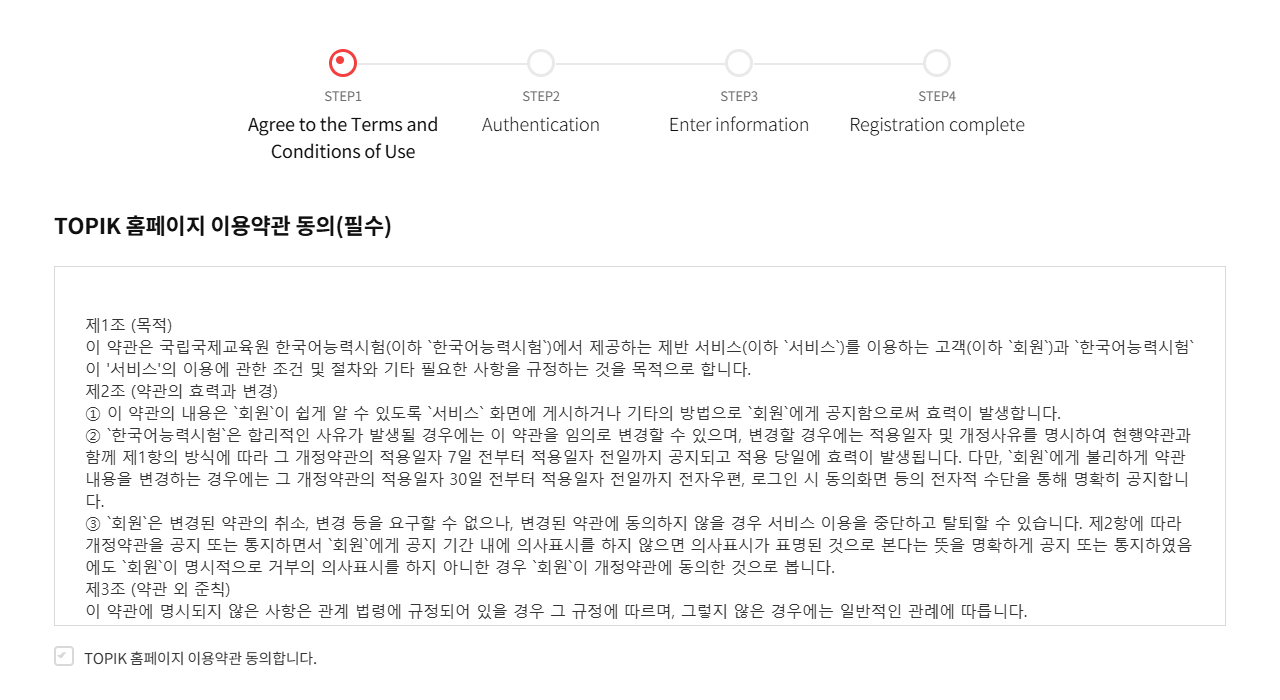 Sign-up step 1 on topik.go.kr with the site switched to English, October 2026. The step labels are translated, but the terms you must agree to (TOPIK 홈페이지 이용약관 동의, required) stay in Korean.
Screen 1: Agree to the Terms and Conditions of Use. Three consent boxes, all required: the site's terms of use, the collection and use of personal data, and the data retention period. A fourth box confirms you are 14 or older. Even in English mode, all three texts stay in Korean. The data list in the consent text is worth reading because it tells you what the next screens will ask for: ID, Korean name, English name, date of birth, gender, nationality, country, occupation, address, email, phone, mobile, photo and first language.
Screen 2: "Authentication". Despite the name, this is not phone verification. You choose:
- Resident in Korea or Overseas resident, then
- Korean or Foreigner, and pick your country from a drop-down.
This is where we stopped, because the next button submits the form. The terms say the remaining screen ("Enter information") asks for an ID, password, name in Korean and English, date of birth, gender, email, address and contact number. The 109th notice adds two rules:
- No disposable or temporary email addresses. Accounts registered with them can be reset or suspended.
- Under-14s cannot sign up in their own name. A parent signs up, and the child's details are entered at registration.
Enter your English name exactly as it appears on the ID you will bring on test day, including middle names and spacing. When you register, the site pulls your details from your account, and the IBT notice tells applicants to check My Page → Edit member information before the window opens.
Logging in later also asks you to type a number shown in an image, an anti-automation check.
Step 2: registration day, screen by screen
NIIED's official guide lists eight steps. The registration system itself (register.topik.go.kr) only works during a registration window and after login, so the details below come from the guide and the round notices, not from our own clicks.
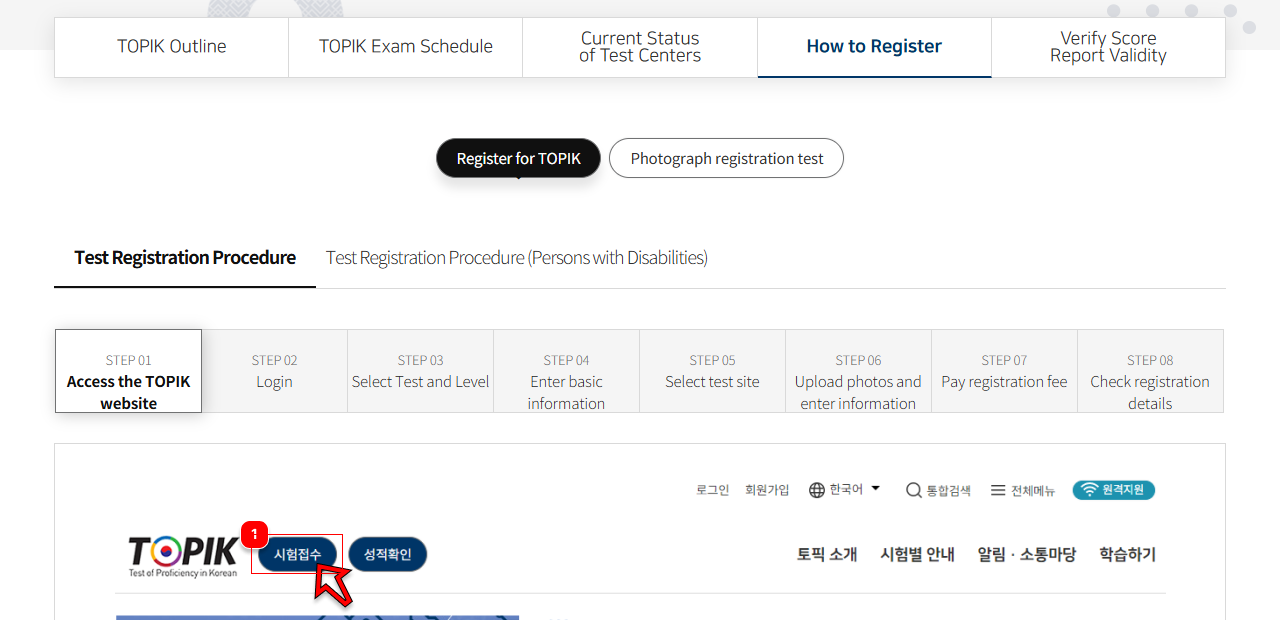 NIIED's own eight-step registration guide (How to Register → Register for TOPIK), October 2026. The worked screenshots below the step bar are of the Korean interface.
| Step | What you do | What can go wrong |
|---|---|---|
| 1. Open the registration site | Click Register for TOPIK on topik.go.kr | Outside the window you get "not a registration period" |
| 2. Log in | Your topik.go.kr ID and password | Forgotten details: use Find ID / Reset password |
| 3. Choose test and level | Pick the round, then TOPIK I or II | Level cannot be changed after registration; you must cancel and re-register |
| 4. Basic information | English name, date of birth, gender; agree; To the next step; a pop-up appears | Pressing Cancel on the pop-up stops you going on |
| 5. Test site | Choose a region, then a site. Full sites show finished (마감) | After this, name, birth date and gender are locked |
| 6. Photo and details | Upload the photo, fill in the remaining details | Some fields are fixed and cannot be edited here |
| 7. Payment | Choose card or virtual account, agree, pay | Unpaid registrations are cancelled |
| 8. Check | Confirm the registration on the summary screen | During the window this is only visible on register.topik.go.kr |
Steps 1–4 save your registration temporarily. You only hold a seat once you pay. One account can book one test site; you can take TOPIK I and TOPIK II at the same site with the same account. Within the window you may switch to another site with free seats, at the same level, up to five times.
NIIED warns that macros, mass bookings from one IP address, and repeatedly grabbing seats without paying can lead to cancellation, account suspension and a criminal complaint.
Paying: the step that stops most foreigners
| Method | Deadline (109th round) | Notes |
|---|---|---|
| Credit card | Within 1 hour of registering | Korean-issued cards only. NIIED says check cards may fail, so recheck your status after paying |
| Virtual account (bank transfer) | 23:59:59 the same day, if the account number was issued before 16:00 | Each applicant gets a different account number. You also enter a refund account. No overseas transfers |
You must choose a payment method within one hour of registering or the booking is cancelled. If you have no Korean card, a virtual account paid by Korean internet banking or at an ATM is the usual route. NIIED suggests going to a bank counter if online transfer fails, and avoiding banks' night-time maintenance hours.
The photo
Applicants get turned away on test day over the photo, so treat it as part of registration, not an afterthought.
- Paper test: 3.5 × 4.5 cm, JPG or JPEG, 200 KB or less, taken within the last six months, front-facing, white background. NIIED says it follows the Ministry of Justice photo standard for alien registration.
- IBT: 413 × 531 pixels, JPG or PNG, 500 KB or less, 300 dpi recommended.
- Rejected: sunglasses, scarves, masks or hats covering the face; group photos; a photo of your ID card; heavily edited or low-quality images.
The photo is printed on your admission ticket and your score certificate. NIIED's notices say that having used the same photo for an earlier test does not make it acceptable now. You can upload or replace the photo until 23:59 three working days before admission tickets become printable, via My Page → Registration status → Register/edit photo.
After you register: corrections and refunds
Corrections. Changing your account details afterwards does not change your registration. For the 109th round, corrections are accepted from 8 September (14:00) until 23:59 on 28 October (three working days before admission tickets become printable on 2 November) through My Page → Registration status → Request correction of applicant information. Only small errors qualify: a typo or missing part in the English name, one wrong element of the birth date, swapped day and month, the wrong gender. Anything bigger means cancelling and registering again during the window.
Refunds depend on when you cancel:
| When you cancel | Refund |
|---|---|
| From the start of registration until 10:00 on the closing day | 100% |
| From 10:00 on the closing day, for 7 days | 50% |
| From then until 13:00 the day before the test | 40% |
| After that | None |
Daily system maintenance runs from 09:00 to 10:00, so do not leave a full refund until the last morning. Card payments are cancelled; virtual-account payments are returned to the refund account you entered, and only if the bank name, account number and holder's name match.
If you plan to take the computer-based test instead, the steps are the same but the fees, photo size and payment deadlines differ; see IBT TOPIK vs the paper test.
Checklist before registration opens
- topik.go.kr account created with a real (not disposable) email
- English name in the account matches your passport or residence card letter for letter
- Photo ready: 3.5 × 4.5 cm, under 200 KB, white background, taken in the last six months
- Windows PC with Chrome; not a Mac, not a phone
- A Korean card, or Korean internet banking for a virtual account
- Two or three test sites shortlisted in case your first choice is finished
- The round's registration notice read for your region's opening day
- Alarm set for 10:00 on that day
Once you have paid, the next dates to watch are the admission-ticket release, about two weeks before the test, and your results; see what to bring on test day and how results and certificates work.
Frequently asked questions
04How much does TOPIK cost in Korea?
The paper-based test costs ₩40,000 for TOPIK I and ₩55,000 for TOPIK II. The internet-based test (IBT) costs ₩70,000 for TOPIK I and ₩95,000 for TOPIK II.
Can I pay the TOPIK fee with a foreign credit card?
No. NIIED accepts only cards issued in Korea or a virtual bank account, and it states that overseas remittance and foreign-issued cards cannot be used. If you have no Korean card, pay by virtual account through a Korean bank.
Can I register for TOPIK on my phone or a Mac?
No. The registration notices say Mac OS is not supported and there is no mobile registration service. Use a Windows PC, preferably with Chrome.
I live outside Korea. Do I register on topik.go.kr?
No. Online registration on topik.go.kr is only for tests taken in Korea. Abroad you register through the local institution that runs TOPIK in your country, listed in the notices on topik.go.kr.
Sources
- TOPIK — How to apply: the 8 registration steps (Korean; English via the site's language menu)
- TOPIK notice — 109th TOPIK registration guide, Korea (Korean)
- TOPIK — FAQ: payment, refunds, photo specification, corrections (Korean)
- TOPIK — Member sign-up, step 1 (Korean)
- TOPIK — Basic operating regulations (Korean)
- TOPIK notice — 16th TOPIK IBT registration guide, Korea (Korean)
- TOPIK — Test schedule, Korea: 109th and 110th rounds (Korean)
Written by
Mokdongnyeok· Editor
Lives in Gyeonggi-do, just north of Seoul, and writes practical guides to the Korean exams foreigners take — walking through each registration screen, working through the official past papers and checking every fee, format and score rule against the official source.
How these guides are madeRelated articles
04TOPIK Levels and Score Bands Explained: What Level 1 to 6 Mean
TOPIK I gives level 1–2, TOPIK II gives level 3–6, decided by your total score. Official cut-offs for paper and IBT, worked examples and what each level means.
6 minTOPIK Test Day: What to Bring, ID Rules and the Timetable
Which IDs TOPIK accepts in Korea, when doors close (09:20 / 12:20), the minute-by-minute timetable, the watch and phone ban, and answer-sheet rules.
7 minHow to Sign Up on Socinet and Apply for a KIIP Course
A screen-by-screen guide to Socinet, the Korean-only KIIP site: sign-up, placement, course applications, the waitlist, fees and booking tests on kiiptest.org.
7 minTOPIK Results and Certificate: How to Check, Print and Verify
When TOPIK results come out (15:00 KST), how to check and print the certificate, the 5-prints-a-day limit, the 2-year validity and how institutions verify it.
6 min