TOPIK Results and Certificate: How to Check, Print and Verify
When TOPIK results come out (15:00 KST), how to check and print the certificate, the 5-prints-a-day limit, the 2-year validity and how institutions verify it.
On this page09
A TOPIK result is not a certificate you are mailed. It is a page you print yourself from topik.go.kr, on your own printer, a limited number of times a day, for as long as the score is valid. Universities, employers and immigration offices then check it online using a number printed on the page. Once you know that, most of the confusion around "where is my TOPIK certificate?" disappears.
Below: when results are released, the two ways to look them up, how printing works and why it sometimes fails, how long the score lasts, and how an institution verifies the paper you hand in.
When results come out
Results are published on topik.go.kr on a fixed date and time announced in advance, usually 15:00 Korean time. The 2026 paper-based rounds:
| Round | Test date (Korea) | Results | Days to wait |
|---|---|---|---|
| 104th | 11 Jan | 12 Feb, 15:45 | 32 |
| 105th | 12 Apr | 29 May, 15:00 | 47 |
| 106th | 17 May | 25 Jun, 15:00 | 39 |
| 107th | 5 Jul | 13 Aug, 15:00 | 39 |
| 108th | 18 Oct | 10 Dec, 15:00 | 53 |
| 109th | 15 Nov | 22 Dec, 15:00 | 37 |
The internet-based test reports much faster, within about three weeks: the 15th IBT on 24 October 2026 reports on 13 November. If your deadline is tight, that alone can decide which format to sit; see IBT TOPIK vs the paper test.
The first 2027 paper round is already on the schedule page: the 110th test on Sunday 10 January 2027 reports on 4 February 2027 at 15:00, a 25-day wait. If a results date changes, NIIED announces it on the notice board.
Two ways to check your result
1. With your account. Log in with the ID you registered with, then My Page → Score status (성적현황).
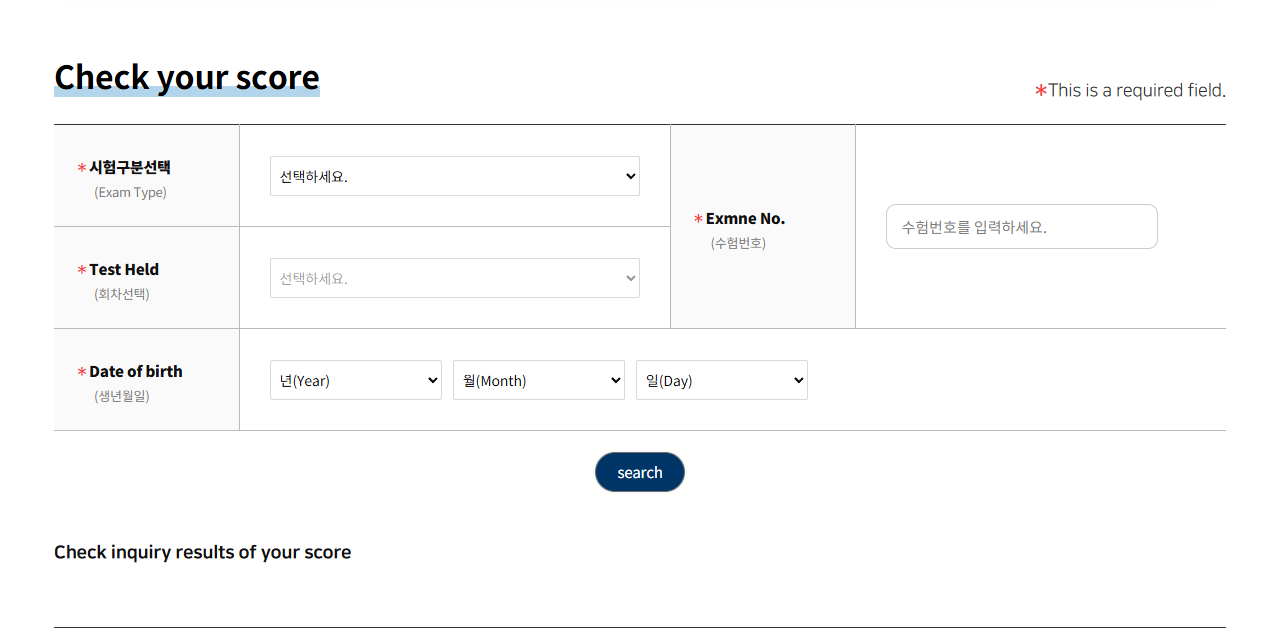 The non-member score lookup on topik.go.kr (English mode), October 2026: exam type, test round, examinee number and date of birth are all required.
2. Without logging in. Click Check your score (성적확인) at the top left of topik.go.kr. The form asks for four things:
| Field | What to enter |
|---|---|
| Exam Type | TOPIK PBT, TOPIK IBT or TOPIK Speaking |
| Candidate number (Exmne No.) | From your admission ticket |
| Test Held | The round, e.g. 108th |
| Date of birth | Year, month, day as registered |
Overseas candidates registered through a local institution, not through a topik.go.kr account, so NIIED tells them to use this non-member route. Keep your admission ticket, or at least your candidate number, until you have printed what you need.
The same form covers the internet-based test and TOPIK Speaking: pick the right Exam Type first, because a PBT candidate number will find nothing under IBT. The same lookup is also reachable from All menu → Non-member test information → Check your score. If the search returns "no results", check the round in the drop-down and the date of birth exactly as you registered it before assuming something is wrong with your score.
Printing the certificate
The score report (성적증명서) is free and printed straight from the site. The rules:
- Print only, no file. NIIED blocks saving to PDF or image "to prevent forgery". You print directly to a physical printer.
- Five prints per day. Plan how many copies you need for applications and print over several days if necessary.
- Nothing is posted, faxed or emailed. NIIED's operating regulations say certificates are issued only through the website. Overseas candidates print from the same site. (The only exception: an overseas institution may ask NIIED to send one copy per candidate in bulk.)
- No separate English edition. NIIED's FAQ says an English-language certificate is not provided.
Why printing fails, and what to do
Printing goes through a security program from a company called MarkAny. Most failures come from the environment, not your score:
| Problem | Likely cause | Fix |
|---|---|---|
| Print button does nothing | Pop-up blocker | Allow pop-ups for topik.go.kr |
| Program will not install | Public PC at a school, library or centre | Use your own computer |
| Printer shows "not supported" | Shared, network or virtual printer | Connect a printer directly, or try another one |
| Odd behaviour in other browsers | Browser | NIIED recommends Chrome |
MarkAny's help line for printing problems is 1544-1204, and the TOPIK Center is on 02-3668-1331.
What is printed on it, and why your name matters
Everything on the certificate comes from what you typed at registration: your English name, date of birth and so on are copied exactly from your admission ticket. NIIED says that if the certificate differs from your other documents, it is up to the university or immigration office to decide whether to accept it, and any disadvantage is your responsibility. If your passport has changed or you spotted a typo, the time to fix it was the correction period before the test; for tests in Korea, nothing can be corrected after that period ends. Overseas candidates can ask their local institution within four weeks of the results, but not for errors they entered themselves. That is one more reason to register carefully.
NIIED also points out that TOPIK is a score certificate, not a licence or qualification. You do not "pass" TOPIK; your certificate states a level. If you want to understand what the level means, see TOPIK levels and score bands.
The two-year validity: a worked example
The score is valid for two years from the results announcement date, not from the test date. NIIED's own example: the 25th test's results were announced on 10 February 2012, so they were valid until 9 February 2014.
Applied to the current rounds:
| Round | Results announced | Valid until |
|---|---|---|
| 108th (18 Oct 2026) | 10 Dec 2026 | 9 Dec 2028 |
| 109th (15 Nov 2026) | 22 Dec 2026 | 21 Dec 2028 |
Since 1 July 2019, once a score has expired the site will not display it or print a certificate at all. Before that date, old scores could still be printed. So:
- Print spare copies while the score is valid if you might need to prove your history later.
- Check the deadline of the institution you are applying to. A score that expires before a visa decision or enrolment date may not be accepted; ask the institution.
What TOPIK level a particular visa or programme requires is a separate question, covered in which TOPIK level you need.
How institutions verify your certificate
Each printed certificate carries a document number (문서확인번호). Only certificates printed online have one. An institution goes to Score certificate verification (성적증명서 진위확인) on topik.go.kr and enters:
- the document number, in four parts;
- the institution's name;
- the name of the person checking;
- their phone number (mobile or landline).
The result shows the candidate's name, gender, test country, date of birth, test type, level, round and test date, and the date the score is valid until. In other words, an institution never has to trust the paper alone, and a certificate altered by hand will not match. Forging or using a forged certificate is listed in NIIED's rules as misconduct carrying a two-year ban from the test.
No appeals, no rescoring
Since the 38th test in 2015, NIIED no longer publishes used questions (they go into a question bank), and with that it abolished score appeals and question appeals. Whatever the site shows on results day is final. If you are disappointed with your writing score in particular, look at how the compositions are marked rather than the number; see TOPIK II writing questions 51–54.
Results-day checklist
- Admission ticket or candidate number to hand
- Chrome on your own computer, pop-up blocker off for topik.go.kr
- A printer connected directly, not a shared or virtual printer
- Count how many copies you need (five per day maximum)
- Note your "valid until" date in your calendar
- Give institutions the original printout; they verify it with the document number
Frequently asked questions
04Can I download my TOPIK certificate as a PDF?
No. To prevent forgery, NIIED does not let you save the certificate as a file; you can only print it directly from topik.go.kr, up to five times a day. It is not sent by post, fax or email.
How long is a TOPIK score valid?
Two years from the results announcement date. After that, the site will not show the score or print a certificate, so print copies while it is still valid.
Can I check my TOPIK result without logging in?
Yes. Use the Check your score menu with the test type, round, candidate number and date of birth. Overseas candidates are told to use this non-member route.
Can I appeal my TOPIK score?
No. NIIED abolished score and question appeals from the 38th test in 2015, when it stopped publishing used questions so they could be kept in a question bank.
Sources
- TOPIK — FAQ: results, certificate printing, validity, foreign candidates (Korean)
- TOPIK — Check your score (non-member lookup)
- TOPIK — Score certificate verification by document number
- TOPIK — Basic operating regulations: validity and certificate issue (Korean)
- TOPIK — Test schedule, Korea: test and results dates, 104th to 110th (Korean)
- TOPIK notice — 109th TOPIK registration guide: results date and how to print (Korean)
- TOPIK — Test overview: purpose, validity and main uses (Korean)
Written by
Mokdongnyeok· Editor
Lives in Gyeonggi-do, just north of Seoul, and writes practical guides to the Korean exams foreigners take — walking through each registration screen, working through the official past papers and checking every fee, format and score rule against the official source.
How these guides are madeRelated articles
04How to Register for TOPIK in Korea: Step by Step on topik.go.kr
What each TOPIK sign-up and registration screen asks for, the 10:00–16:00 window, fees (₩40,000/₩55,000), Korean-only payment and the photo rules.
8 minTOPIK Levels and Score Bands Explained: What Level 1 to 6 Mean
TOPIK I gives level 1–2, TOPIK II gives level 3–6, decided by your total score. Official cut-offs for paper and IBT, worked examples and what each level means.
6 minTOPIK Test Day: What to Bring, ID Rules and the Timetable
Which IDs TOPIK accepts in Korea, when doors close (09:20 / 12:20), the minute-by-minute timetable, the watch and phone ban, and answer-sheet rules.
7 minHow to Sign Up on Socinet and Apply for a KIIP Course
A screen-by-screen guide to Socinet, the Korean-only KIIP site: sign-up, placement, course applications, the waitlist, fees and booking tests on kiiptest.org.
7 min